![RETURNGO.png]](https://support.returngo.ai/hs-fs/hubfs/RETURNGO.png?height=40&name=RETURNGO.png)
For all other payment methods, refunds must be issued back to the original payment method.
Refunding Customers Who Pay Via Cash on Delivery
For COD orders, use the Refund to Bank Account resolution to collect the customer’s IBAN, transfer the funds from your bank, and then mark the RMA as refunded.
ReturnGO does not execute the bank transfer, and this action is not logged back to the Shopify order.
Capabilities
ReturnGO’s refund to bank account return resolution enables you to:
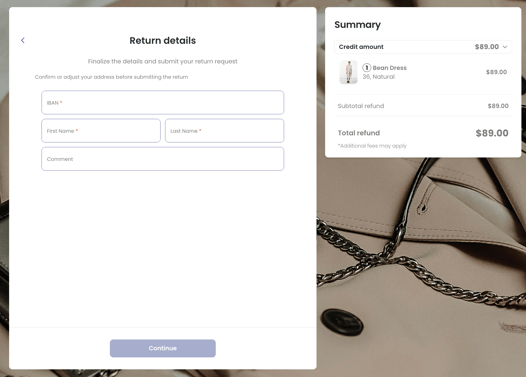
- Receive the customer’s IBAN details. The customer will be prompted to enter their IBAN details in the return portal.
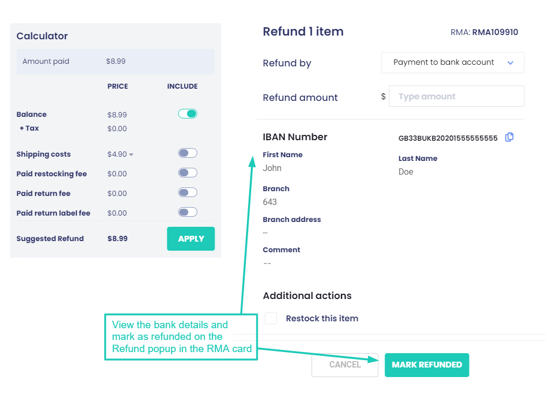
- Document the refunded amount in the RMA page.
Requirements and Limitations
The requirements and limitations of the refund to bank account resolution are:
- ReturnGO does not execute the money transfer to the customer’s bank account.
- You can use the IBAN provided by the customer to transfer the money between banks while documenting it on the RMA page.
- Marking a refund to bank account request as “refunded” does not get logged back to the Shopify order.
Configuring Refund to Bank Account
To offer the option of a refund to bank account:
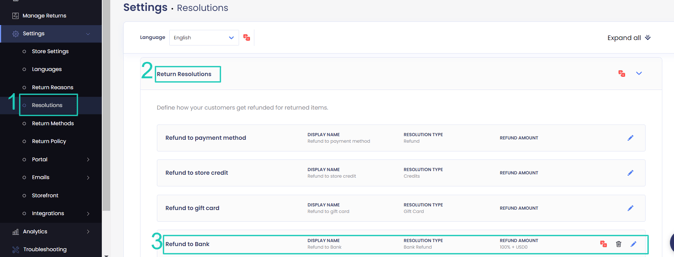
1. Go to Settings > Resolutions.
2. Open the Returns Resolutions section
3. Click REFUND TO BANK or create a new resolution.
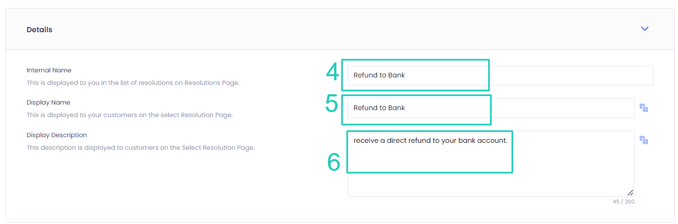
4. Edit the internal name of the resolution.
5. Edit the name of the resolution as it will be displayed on the return portal.
6. Edit the description that will appear in your return portal.
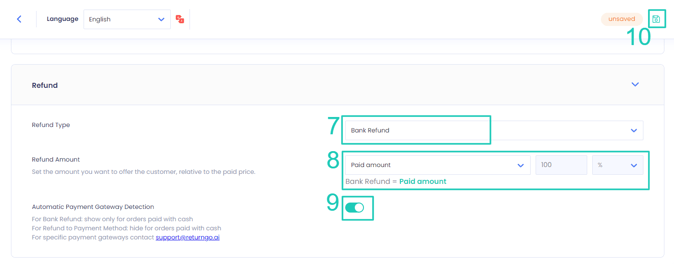
7. Set the Refund Type to Bank Refund. This only appears if you are creating a custom resolution.
8. Modify the refund amount you want to offer.
9. You can enable automatic payment gateway detection if you want to show this resolution only if the order was paid with cash (i.e. Cash on Delivery).
10. Click on the save icon to save your changes.
You can use this resolution to build your return policy in your Return Policy where you can configure additional settings such as eligibility rules, fees, and more.
Configuring Refund to Bank Account Fields
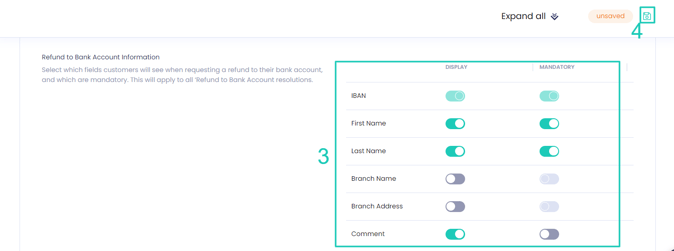
You can customize the fields you require customers to fill out in the return portal when requesting a refund to bank account.
To configure the fields:
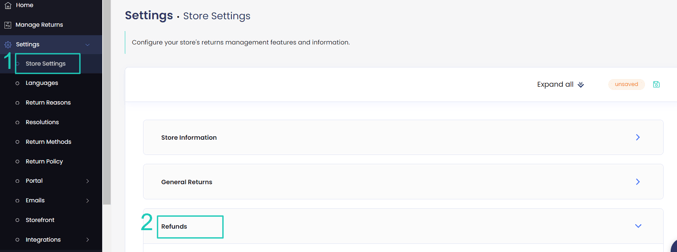
1. Go to Settings > Store Settings.
2. Open the Refunds section.
3. Set which fields you want to show on the return portal and mark whether each is mandatory or optional.
4. Click on the save icon to save your changes.