
Return Guard is a return coverage model that enables customers to pay a small fee at the time of purchase in order to get free returns later, simplifying the return process and ensuring a seamless post-purchase experience. Return Guard reduces return costs and promotes a more transparent return policy.
Note: Return Guard is a legacy plan and is no longer available for new installations.
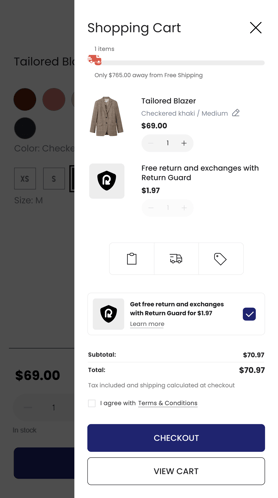
Table of Contents
Capabilities
- The Return Guard plan includes all features available in the Pro plan, except shipping integrations.
- Customers can easily add return coverage in their cart or when placing an order for a fee.
- Free return labels through ReturnGO.
- Free access to ReturnGO’s return management system.
- ReturnGO is the label provider for all return labels.
- New revenue stream through a revenue share model on coverage fees.
- Unlimited returns.
- Domestic and international shipments.
- Return Guard currently supports the following countries:
- United States
- Canada
- United Kingdom
- France
- Germany
- Belgium
- Netherlands
- Hong Kong
- Singapore
- Australia
- New Zealand
- View the full list of supported countries, carriers, and service levels for more information.
- Return Guard currently supports the following countries:
Limitations
- Due to Shopify limitations, the coverage option won't be added to their cart by default and must be manually chosen by the customer in their cart.
- To use the free plan, Return Guard must be enabled on your store. If you do not want to offer Return Guard, you must switch to a paid plan to use ReturnGO.
- Return Guard is currently not supported on Headless stores (Hydrogen).
Requirements
You must be on the Return Guard plan.
To set up Return Guard, you will need:
- A Shopify store.
- ReturnGO app extension enabled on your Shopify store.
- Return methods using a Ship by Return Guard connection.
- For existing ReturnGO users, ReturnGO will automatically duplicate and update your existing return methods to include coverage options.
- Return policy rules that incorporate the Ship by Return Guard return methods.
- For existing ReturnGO users, ReturnGO will automatically duplicate and update your existing return policy rules to use the new return methods with coverage.
What is Return Guard?
Return Guard enables customers to opt for return coverage when placing an order, ensuring they can return items without additional charges. This enables you to offer higher transparency, boost conversions, and reduce return costs.
How Return Guard Works
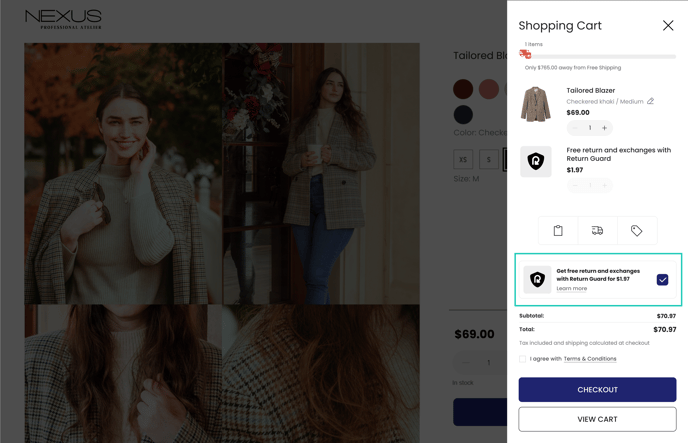
When customers add Return Guard to their order, the Return Guard “product” is added to their cart, and they pay the coverage fee at checkout.
The Return Guard coverage fee is dynamically determined by ReturnGO and starts at $1.97, and may vary based on a combination of factors such as label costs and your store’s return rate.
Note: The Return Guard fee cannot be customized and is subject to ReturnGO’s discretion.
10% of the fee is retained by your store, allowing for revenue-sharing benefits, while the remainder is passed on to ReturnGO.
With Return Guard enabled:
- Customers are offered the option to buy return coverage when placing an order.
From this point, there are two possible flows depending on whether the customer opts in for return coverage or not.
If the Customer Purchases Coverage
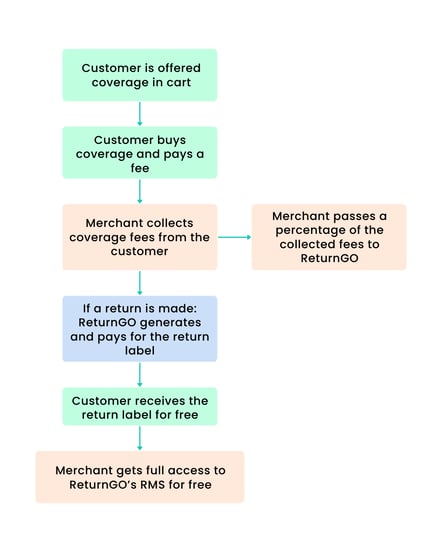
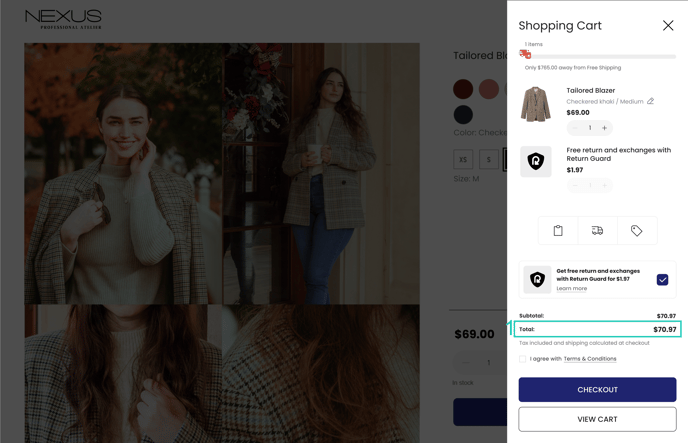
- The fee is calculated and added to the total order value.
- The fee collected from the customer is transferred to ReturnGO.
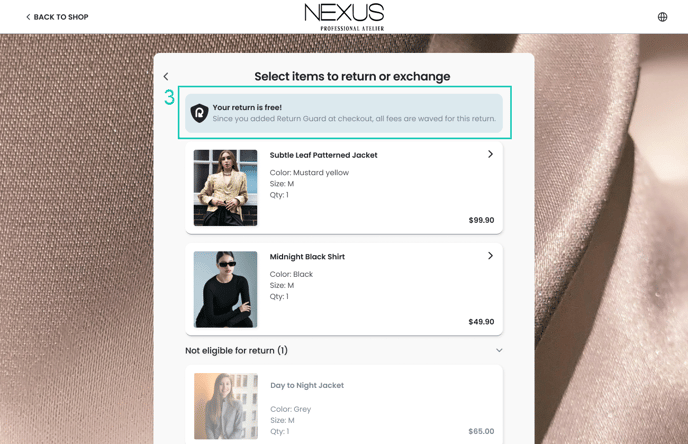
- If a return is initiated, the customer sees a note at the top of the portal stating that the return is free.
- ReturnGO generates and pays for the return label.
- The customer receives the return label for free.
Note: The default is completely free returns (no fees), but a return or restocking fee can be added if you so choose.
If the Customer Doesn’t Purchase Coverage
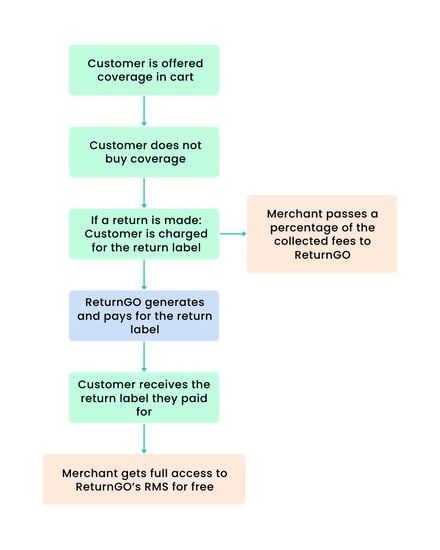
- The customer does not pay for coverage.
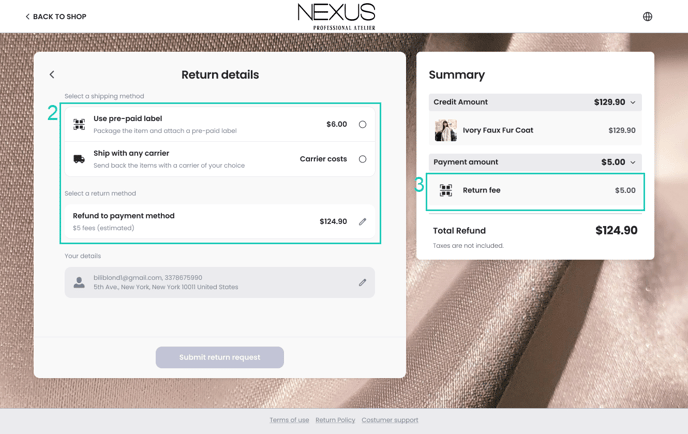
- If a return is initiated, the customer selects a shipping and return method.
- The customer is charged for the return label.
- The merchant pays the label cost to ReturnGO (as ReturnGO is the label provider).
- The customer receives the return label they paid for.
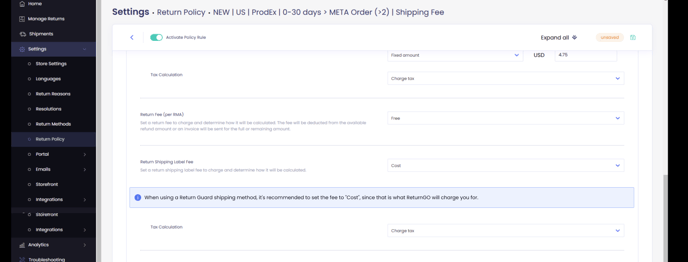
Note: The fees depend on your return policy setup. By default, the label fee for uncovered returns is set based on the label cost, so that the customer pays for the label.
However, if you prefer, you can add a fixed amount in addition to the label cost. ReturnGO charges you only for the label cost, so you would retain the additional amount.
Coverage Widget Placement
The Return Guard coverage widget is automatically injected into cart drawers. It is not automatically injected into the cart page. To display the coverage widget on the cart page, you must manually add it using the Shopify theme editor.
Return Guard Billing
On the Return Guard plan, You are charged based on the number of return labels generated and Return Guard fees collected from customers.
Labels and Return Guard fees are billed as usage, either through your eCommerce platform or through the Wallet.
Viewing Return Guard Billing
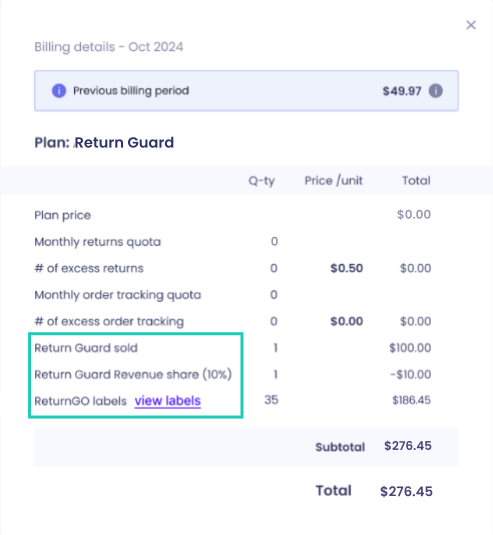
On the Billing page, you can see how much you were charged each month. To view billing details, click the details icon.

After clicking the icon, the following information is displayed:
- Return Guard Sold: The total number of Return Guard coverages sold and the total Return Guard fee amount collected from customers.
- Return Guard Revenue Share (10%): The 10% revenue share that you get to keep from Return Guard fees you collected from your customers.
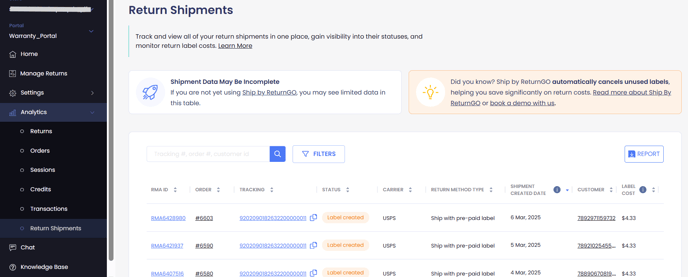
- ReturnGO Labels: The total number of return labels generated. Click VIEW LABELS to open the Return Shipments page automatically filtered for that month, to see the details and cost of each label.
Clicking on VIEW LABELS takes you to the Return Shipments page where you can track all the labels and view a detailed breakdown, including individual costs and service levels used.
Wallet
The Wallet is a prepaid balance, that can be used to pay for return shipping labels generated through Ship by ReturnGO and Ship by Return Guard. Once funded, label charges are automatically deducted from your wallet balance instead of billing them through your eCommerce platform.
You can add credits manually or enable automatic recharges to ensure your wallet maintains sufficient funds.
Note: Only return label charges are deducted from the Wallet. All other ReturnGO charges, such as subscription fees and excess return usage, continue to be billed through your existing billing method.
On the Billing page, you can access Wallet History to view all wallet transactions, including recharges, label deductions, and balance updates.
Switching Between Plans
If you decide to switch from the Return Guard plan to another ReturnGO plan, you will automatically receive a 14-day free trial.
When switching between plans, it’s important to update your return methods to reflect the changes in your plan.
Note: Switching to a different plan does not automatically remove the Return Guard product from your store. It’s recommended to manually remove it from your Shopify catalog when switching plans.
Return Guard FAQs
Can a customer get a refund for Return Guard if they don’t return the item? Can they use it for another item or order?
No, Return Guard fees aren’t refundable and can’t be transferred to another item or order. It works like insurance—customers pay a small fee at checkout for the option to return their item for free. If they don’t use it, the fee is not refunded.
Can a shopper add Return Guard after placing an order?
No, Return Guard must be selected when placing the order. If they don’t add it when placing the order, they will have to pay return fees if they decide to return an item later.
Can Return Guard be offered only for orders above a certain amount?
ReturnGO does not currently support restricting Return Guard based on the order total.
Does Return Guard apply to all return methods and resolutions?
Yes. When the customer pays the Return Guard fee at checkout, the first return for that order is free, regardless of the return method or resolution. This includes refunds, exchanges, pre-paid label shipments, no shipment required, and any other supported return scenarios.
Does Return Guard apply to gift returns, in cases where the original buyer is not the one requesting the return?
Yes, Return Guard applies to gift returns, as it is linked to the order. The return is covered regardless of whether the original buyer or the gift recipient initiates the return.
How much does Return Guard cost per month?
The Return Guard plan is completely free. The only thing you get charged for is uncovered labels and coverage fees that you collected from customers.
How do I track how many Return Guard coverages were sold in the ReturnGO dashboard?
You can view the number of Return Guard coverages sold on the Billing page by clicking the details icon.
What's the difference between Ship by Return Guard and Ship by ReturnGO?
Ship by ReturnGO is ReturnGO's built-in return shipping solution for regular subscription plans, while Ship by Return Guard is a label mechanism specifically for Return Guard. While both use the same backend technology, they have different purposes and billing structures.
How is the Return Guard coverage fee calculated?
The Return Guard fee is set by ReturnGO. The fee price starts at $1.97, and may vary based on a combination of factors, including label costs and your store’s return rate. The fee is determined automatically and cannot be customized.
Can I use any shipping carrier for returns with Return Guard?
You cannot use any other shipping carrier when using the Return Guard plan. Return Guard only supports Ship by Return Guard labels.
Is Return Guard treated as a product in Shopify?
Yes. Return Guard is added to the customer’s cart as a product in your Shopify store. It appears as a line item during checkout, and the cost is processed just like any other product. Since it’s treated as a product, you can apply Shopify settings to it, such as restricting access to specific markets.
Can I use the free plan without offering Return Guard on my store?
To use ReturnGO’s free Return Guard plan, Return Guard must be offered on your store. If you want to use ReturnGO without Return Guard, you’ll need to switch to a paid plan.
Is there a limit to the number of returns with the Return Guard plan?
The Return Guard plan includes unlimited returns. If you notice a number like 900,000 on your plan, don’t worry - it does not impose any restriction on the number of returns you can process.
Will I get a trial if I switch from the Return Guard plan to a paid plan?
Yes. If you switch from the Return Guard plan to a paid plan, you’ll automatically get a 14-day free trial.
Can I use Return Guard with Amazon MCF?
Yes, you can use Return Guard together with Amazon MCF.
To use Return Guard with MCF, there is no need to install via the special MCF link - instead, you can select the regular free Return Guard plan and integrate your Amazon MCF account as usual.
Who pays for the return label if the customer purchases Return Guard?
When a customer returns an order that's covered by Return Guard, the customer’s return label fee is waived, and ReturnGO covers the return label cost. You will not be charged for return labels of covered returns.
What features are included in the Return Guard Plan?
The Return Guard plan includes all features available in the Pro plan, except for shipping integrations.
How many languages are included in the Return Guard plan?
Return Guard includes the same features as the Pro plan, which comes with up to 5 languages.
Ship by Return Guard
Ship by Return Guard is a native label generation method available exclusively with the Return Guard plan. It is the Return Guard return method, automatically creating return labels for both covered and non-covered returns.
Capabilities
- Automatic label creation
- Waives return fees for covered orders
- International shipping
- Tracking return shipments directly in ReturnGO
- Viewing label costs and shipping details directly in ReturnGO
- Automatic detection of Return Guard coverage
- Using the Wallet to pay for return labels
Requirements
- Return Guard plan
- Ship with pre-paid label return method using a Ship by Return Guard connection
- Policy rules using a Ship by Return Guard return method
Benefits
Ship by Return Guard offers the following benefits:
- Uses a single return method and policy rule for both covered and non-covered cases.
- Automatically detects coverage and waives fees for covered orders.
- ReturnGO covers the cost of labels and waives return fees for covered orders.
- No configuration or integration necessary.
Limitations
- No manual selection of carrier or service level.
- Only returns using the Ship by Return Guard return method will be supported by Return Guard. Other return methods will not trigger Return Guard coverage or waive fees.
- Shipping integrations cannot be used on the Return Guard plan. All labels must be provided via ReturnGO.
How It Works
When a customer submits a return, ReturnGO checks whether Return Guard coverage was purchased:
- With coverage:
- ReturnGO pays for and generates the label.
- All return fees are waived, even if the return policy rule normally charges them.
- Without coverage:
- The customer is charged for the label cost.
- Any return fees configured in the policy rule apply.
ReturnGO automatically selects the optimal carrier and service for all Ship by Return Guard returns.
Note: Return Guard only covers return methods using Ship by Return Guard. Other return methods can be used, but will not be covered by Return Guard coverage.
Supported Return Guard Methods
To use Return Guard, all return methods must be set to Ship with pre-paid label with Ship by Return Guard as the connection.
Return Guard will only cover returns using Ship by Return Guard return methods. If a return method other than Ship by Return Guard is used (e.g., drop-off locations, shipping carrier integrations, or ship with any carrier), Return Guard coverage will not apply, ReturnGO will not cover the label cost, and the fees will not be waived.
To ensure full functionality and coverage, it’s recommended to exclusively use Ship by Return Guard return methods.
Note: Since Ship by Return Guard is only available in the Return Guard plan, if you switch to a different plan, you’ll need to manually update your return methods to use a supported shipping connection.
How to Enable Ship by Return Guard
Ship by Return Guard is available when you have a Return Guard plan. To use it, configure a return method with Ship by Return Guard as the connection and apply it to your return policy rules.
Setting Up Ship by Return Guard Return Methods
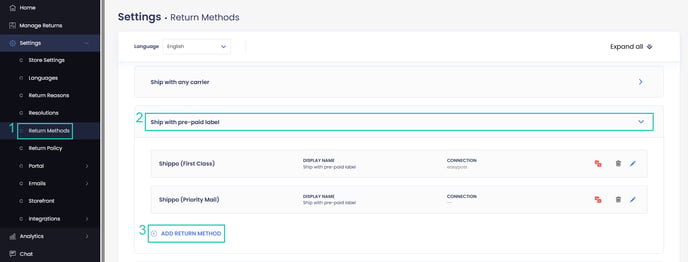
- Go to your Settings > Return Methods.
- Open the Ship with pre-paid label section.
- Click ADD RETURN METHOD or select a return method to edit.
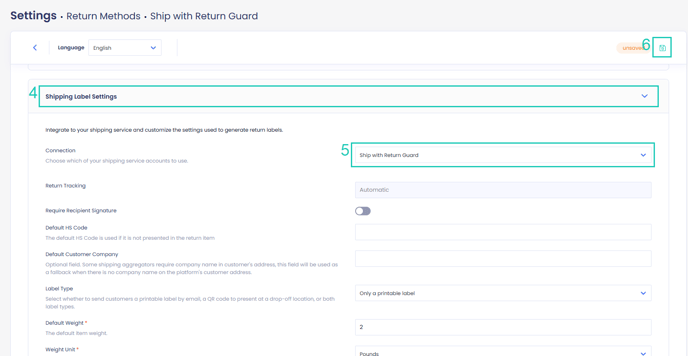
- Open the Shipping Label Settings section.
- Set Connection to Ship by Return Guard.
- Click on the save icon to save your changes.
Setting Up Ship by Return Guard Policy Rules
Once you've set up the Ship by Return Guard return method, you need to apply it to your return policy rules to ensure that it is used for both covered and non-covered returns.
To configure your return policy for Return Guard:
- Go to Settings > Return Policy.
- Click ADD RULE to create a new policy or select an existing rule to edit.
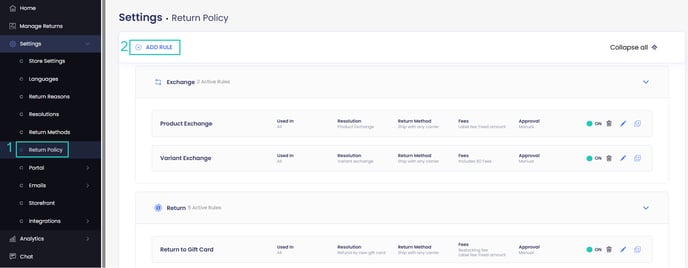
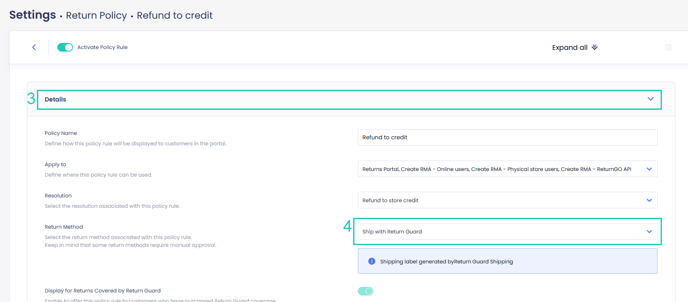
- Open the Details section.
- Select the return method that uses Ship by Return Guard.
- Set up and configure the following:
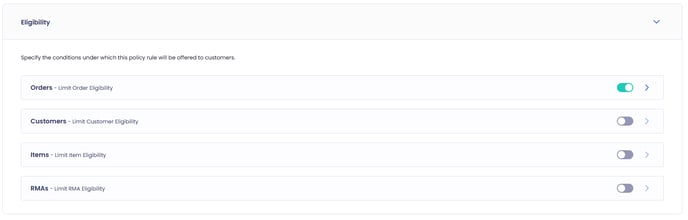
- Policy Rule Eligibility: Specify which customers, orders, and cases are eligible for this policy rule.
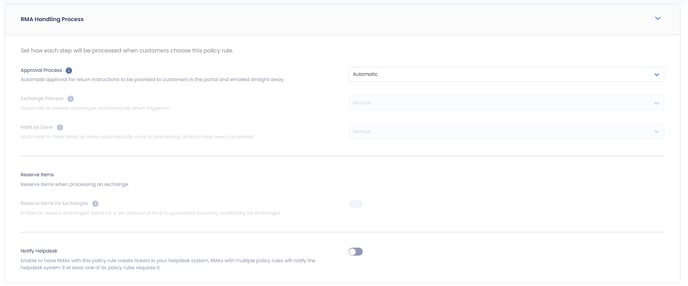
- RMA Handling Process: Configure any automation rules you want.
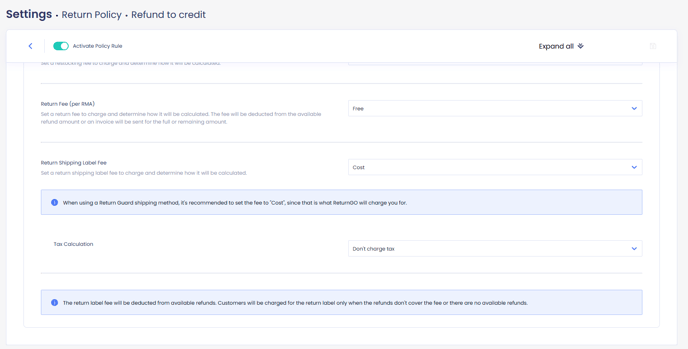
- Additional Payments: Define what fees you want to charge for uncovered returns.
Note: Any fees you set will only apply to non-covered returns. The minimum return label fee you can charge is the label cost (to cover the shipping label). You can add additional fees if you want, but the customer must at least pay for the label cost. For covered returns, all fees will be automatically waived.
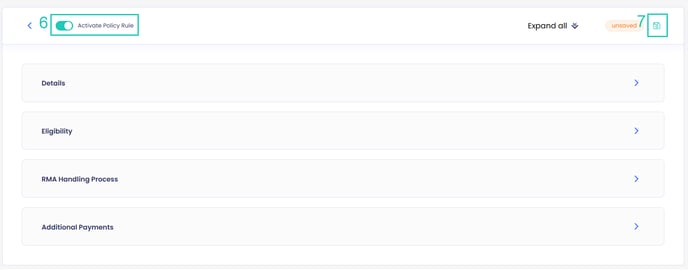
6. Toggle the Activate Policy Rule switch to enable or disable the policy rule.
7. Click on the save icon to save your changes.
Label Fee Configuration
By default, return policies that use a Ship by Return Guard return method support both fixed and cost-based label fees.
However, if the return method is configured to use a dynamic address, setting the return label fee to cost or cost + amount is unsupported.
Troubleshooting
If Ship by Return Guard is not functioning as expected, follow these steps to identify and resolve the issue:
Incorrect Charges or Fee Waivers Not Working
If customers are being incorrectly charged or return fees are not waived despite having Return Guard coverage, it may be because a non-Ship by Return Guard return method is applied.
To resolve this:
- Ensure that a return method using Ship by Return Guard is applied to the return policy rule.
- Verify that the order is eligible for Return Guard and that coverage was purchased.
- If a non-Ship by Return Guard method is used, labels and waiving fees will not apply and ReturnGO will not cover the return.
Return Guard in Unsupported Regions
There may be issues if you have customers in countries that aren’t supported by Return Guard. For example, a customer might buy Return Guard when placing their order, but when they go to return the item, Return Guard won’t work because it doesn’t support their country, leading to a failed label creation attempt.
To avoid this issue, ensure that Return Guard can only be bought in countries where it's supported. You can manage this through Shopify settings, as Return Guard is sold as an item in your store.
- Limit Return Guard Purchases: Restrict the availability of the Return Guard item through your Shopify settings according to markets, to prevent customers in unsupported countries from purchasing Return Guard coverage.
- Alternative Return Methods: For those unsupported regions, you can set up alternative return methods such as Ship With Any Carrier to process returns without Return Guard.
Ship by Return Guard FAQs
What's the difference between Ship by Return Guard and Ship by ReturnGO?
Ship by Return Guard is a label mechanism designed specifically for Return Guard, while Ship by ReturnGO is ReturnGO's built-in return shipping solution for regular subscription plans. While both use the same backend technology, they have different purposes and billing structures.
Ship by Return Guard waives fees for covered returns and automatically selects the carrier and service.
Ship by ReturnGO enables you to choose specific carriers but is not compatible with Return Guard. ReturnGO will only recognize coverage status when using Ship by Return Guard.
Can I use a different shipping carrier with Return Guard?
You cannot use a different shipping carrier with Return Guard. Return Guard coverage only works with Ship by Return Guard return methods. Alternate return methods, such as return to drop-off location, can be used but will not be covered by Return Guard coverage.
Can I use a different return method other than ship with pre-paid label?
Return Guard exclusively supports Ship with pre-paid label return methods that use Ship by Return Guard. If you use any other return method (e.g., drop-off location or ship with any carrier), Return Guard coverage will not apply, and fees will not be waived.
Can I use other shipping integrations while on the Return Guard plan?
No, you cannot use third-party shipping integrations while on the Return Guard plan. All return labels must be provided through ReturnGO using Ship by Return Guard.
If your store serves both supported and unsupported Return Guard regions, you can still process returns for unsupported regions using alternative return methods like Ship With Any Carrier.
To avoid confusion, make sure Return Guard coverage is only offered to customers in supported regions, so they don't purchase coverage they can't redeem.
Can Return Guard be used for international returns?
Yes, Return Guard supports international shipping, automatically selecting the best carrier and service for international returns, according to the list of supported countries.
Can I create test labels with Return Guard?
There is currently no test mode for Return Guard labels. If you need to cancel a label, please contact ReturnGO support.
Do I need to make separate policy rules for covered and non-covered returns?
You do not need to make separate policy rules for covered and non-covered returns. Any policy rule using a Ship by Return Guard return method will apply to both covered and non-covered returns. ReturnGO automatically waives or charges fees accordingly.